How Long Do Robot Vacuums Last?
How long robot vacuums last depends on upkeep, parts availability, and repair options. There's no fixed lifespan, so choose one you can maintain and repair.
On this page (9 sections)
- How long do robot vacuums last?
- What should you check before buying for long-term use?
- What affects a robot vacuum's lifespan?
- How should you set up a robot vacuum to avoid trouble?
- Which parts need regular care?
- Which self-emptying robot suits your upkeep routine?
- Which common mistakes should you avoid?
- When should you repair or replace a robot vacuum?
- How long should you keep your robot vacuum?
How long robot vacuums last depends on upkeep, replacement parts, and repair options, with no fixed lifespan that applies to every model. Choose a robot you can keep clean and service rather than assuming a longer run time or larger dock means more years of use.
A drop in pickup or battery endurance doesn't automatically mean the whole machine is finished. The useful question is whether routine care or a practical repair can restore the cleaning you need.
How long do robot vacuums last?
A robot vacuum lasts as long as its working parts and available support let it meet your cleaning needs. There isn't enough model-specific evidence here to give these 4 robots a reliable lifespan in years.
Separate 3 things when comparing claims: run time is time per charge, dock capacity is debris storage, and service life is how long the machine remains useful. None is a substitute for the others.
A robot collecting pet hair daily needs more frequent checks than one covering a lightly used room. More work means more opportunities for brushes to collect hair and filters to fill, so match care to the debris you see.
How long do robot vacuum batteries last?
Battery life in years varies with use, charging conditions, and battery condition. A quoted run time in minutes describes a cleaning session, not how many years the battery will serve you.
Compare runs with similar rooms, suction settings, and floor conditions before judging a decline. A higher cleaning setting or extra passes can shorten a session without indicating a fault.
If endurance stays lower after routine care, follow the brand's battery checks. Confirm the exact replacement and installation steps before ordering one.
What should you check before buying for long-term use?
Check parts and support before choosing extra features. A suitable replacement brush or battery can matter more later than a feature you rarely use.
Use this checklist before committing:
- Replacement parts: Find compatible filters, brushes, batteries, and any dock bags the model needs.
- Repair access: Check which parts you can replace yourself and which need service.
- Routine care: Read how the brush comes out and how the bin, filter, and dock are cleaned.
- Floor fit: Match vacuuming and mopping functions to your rugs and hard floors.
- Controls: Confirm Wi-Fi requirements and which functions depend on the app.
An available part today doesn't promise permanent support. Still, clear part numbers and repair instructions give you a better basis for choosing than a vague durability claim.
For connected models, read whether a robot vacuum needs Wi-Fi before planning where to place the dock. Connection needs can affect setup and access to room controls.
What affects a robot vacuum's lifespan?
Debris, floor conditions, and missed care affect how much attention a robot needs. Choose a schedule you can maintain instead of running it unattended through avoidable hazards.
Long hair can wrap around brush ends and wheel axles. Our guide to stopping hair from tangling in a robot vacuum brush explains how to reduce buildup.
Rug fringe, loose cords, and small clothing items can interrupt cleaning or jam moving parts. Pick them up first, and keep the robot away from spills and pet accidents.
Carpet also changes the cleaning task and battery demand. Read how robot vacuums work on carpet before expecting one routine to suit every room.
How should you set up a robot vacuum to avoid trouble?
Give the dock a stable position and clear the first cleaning route. Follow the manual's clearance instructions so the robot can leave and return without squeezing past furniture.
Before the first mapping run, remove cords, socks, and loose rug edges. Open the rooms you want mapped, then watch where the robot catches or struggles.
Use supported boundaries to exclude problem areas rather than repeatedly rescuing the robot from the same spot. Keep the dock in its chosen place unless you're ready to follow the model's relocation guidance.
Check the bin and brush after the first few runs to learn how quickly your home fills them. Set later inspections around that pattern, especially during heavy shedding.
Which parts need regular care?
Check brushes, wheels, filters, sensors, charging contacts, and the debris path. A self-emptying dock handles one task, but it doesn't remove hair from brush ends or clean sensors.
Switch the robot off as directed before removing parts. Use only the cleaning methods allowed for each component, since a washable filter doesn't mean every nearby part can get wet.
| Part | What to check | Useful action |
|---|---|---|
| Main and side brushes | Wrapped hair, bent or worn sections | Remove debris and replace worn parts as directed |
| Wheels | Hair around axles or restricted movement | Clear accessible debris without forcing parts |
| Filter and bin | Packed dust or blocked airflow | Empty and clean using the approved method |
| Sensors and contacts | Dust or residue | Wipe as the manual directs |
| Dock debris path | Blockages or a full bag or container | Clear the path and empty or replace as needed |
Let washable parts dry fully before reinstalling them. Don't use household cleaners on sensors or charging contacts unless the instructions allow it.
Follow how to clean a robot vacuum for a fuller routine. Inspect more often when the brush or bin fills quickly.
Which self-emptying robot suits your upkeep routine?
Choose by the care you're willing to do and the floors you need cleaned. None of these features establishes that one model will last more years than another.
Roomba 105 Vac for vacuum-only homes
Choose the Roomba 105 Vac if you want dry floor cleaning with room targeting and keep-out zones. Its app also lets you check filter life, which can help you remember a task the dock doesn't handle.
Skip it if mopping is a main reason you're buying a robot. Its multi-surface brush still needs inspection, so allow time for hair removal even when the dock bag has space.
Roborock Q7 M5+ for pet homes wanting occasional mopping
Choose the Q7 M5+ if you want vacuuming plus mopping with 3 water-flow settings. Its dual anti-tangle brush design addresses hair wrap, making it worth considering when brush care is a frequent chore.
Skip it if automatic mop lifting is essential to your floor plan, since that feature isn't established here for this model. Plan how to protect rugs during mopping, and keep checking brush ends despite the anti-tangle design.
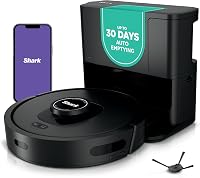
Shark AV2501S for homes avoiding dock bags
Choose the Shark AV2501S if you'd rather empty a reusable base container than buy replacement dock bags. Shark pairs a self-cleaning brushroll with a base whose HEPA filtration it says captures 99.97% of dust and allergens down to 0.3 microns.
Skip it if lifting out and discarding a sealed bag sounds easier than emptying collected debris. Recharge and Resume helps it continue unfinished cleaning, but repeated charging faults still need attention.
Roborock Q10 S5+ for mixed floors needing mop control
Choose the Q10 S5+ if you want vibrating mopping, carpet detection, and automatic mop lifting. Its mop lifts up to 8 mm, so check your rug pile rather than assuming every carpet will stay clear of the pad.
Skip it if you only want dry vacuuming and don't want mop care. Its obstacle avoidance adds help around objects, but clear loose cords and pet messes before starting a run.
Dock storage intervals vary with how much debris your home produces. Our guide to choosing a self-emptying robot vacuum explains the bagged and bagless decision in more detail.
Which common mistakes should you avoid?
Don't confuse less emptying with less care everywhere. A large dock bag can hide how much hair is collecting around the robot's moving parts.
Avoid these habits:
- Waiting for a failure alert: Inspect dirty brushes and filters before pickup becomes poor.
- Replacing parts by guesswork: A clog, changed setting, or dirty contact can resemble a worn component.
- Washing every removable part: Only wash parts the manual identifies as washable.
- Choosing maximum suction for every room: Use the setting the task needs, and account for shorter run time.
- Forcing a stuck robot free: Stop it first, then release trapped fabric or cords carefully.
Keep a simple note of recurring errors and completed care. That record helps you explain a fault to support and avoid buying the same unsuccessful fix twice.
When should you repair or replace a robot vacuum?
Repair an isolated problem when compatible parts and a clear fix are available. Consider replacement when faults keep returning, support is limited, or repairs no longer make sense for your needs.
Start with the symptom: poor pickup, failed docking, reduced run time, or navigation errors. Follow the matching troubleshooting steps instead of replacing several parts at once.
Before paying for service, ask what the repair covers and what happens if the fault remains. Check warranty terms first, since coverage and exclusions affect your next step.
Replace the robot when the remaining cost and effort outweigh its usefulness. Our robot vacuum buying guide for pet hair helps you compare features if shedding is your main cleaning problem.
How long should you keep your robot vacuum?
Keep it while routine care and practical repairs deliver the cleaning you need. When deciding how long robot vacuums last in your home, use their condition and service options rather than a promised age.
Pick the Roomba for vacuum-only room control, the Q7 M5+ for vacuuming with occasional mopping, the Shark for a bagless base, or the Q10 S5+ for mixed-floor mop control. Confirm replacement parts before choosing any of them.
If your current robot has started struggling, use our robot vacuum cleaning guide before spending on a replacement.
Frequently asked questions
How many years does a robot vacuum usually last?
There's no fixed number of years that applies to every robot vacuum. Use, upkeep, repair options, and access to compatible parts affect its useful life.
Before buying, check replacement battery and brush availability rather than treating a warranty period or a dock's debris capacity as a lifespan estimate.
What part usually wears out first on a robot vacuum?
No single part always wears out first. Brushes, filters, batteries, and wheels need attention at different times depending on the model and how you use it.
When pickup or run time drops, check for clogs, wrapped hair, and changed settings before buying parts, then follow the manual's replacement guidance.
Can a robot vacuum last 10 years?
Don't make 10 years your buying assumption without evidence for that model. Long service depends on the condition of the robot, compatible replacement parts, and repairs that remain practical.
A working motor alone isn't enough if charging, wheels, controls, or essential app functions no longer meet your needs.
How can I make my robot vacuum last longer?
Keep brushes, wheels, filters, sensors, and charging contacts clean using the manual's methods. Clear loose cords and wet messes before runs, and replace worn parts with compatible ones.
Check more often during heavy shedding, and remember that a self-emptying dock still needs care between bag changes or base emptying.