Does a Robot Vacuum Need Wi-Fi?
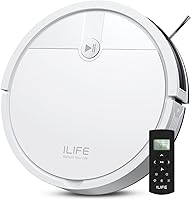
No, you don't need Wi-Fi for a robot vacuum designed to work offline. The ILIFE V2 and eufy 11S MAX use remotes and buttons; choose a connected model for app-based controls.
On this page (8 sections)
- What works without Wi-Fi?
- What does Wi-Fi add to a robot vacuum?
- Which connected robot suits your cleaning routine?
- Do I need Wi-Fi for a robot vacuum with an app?
- How should you set up your first cleaning run?
- Which buying and care mistakes should you avoid?
- How can you protect a connected vacuum account?
- Do you need Wi-Fi for your robot vacuum? Make the choice
No, you don't need Wi-Fi for a robot vacuum if you choose one designed for offline use. The ILIFE V2 and eufy 11S MAX clean through physical remotes and onboard buttons without joining your home network.
Choose Wi-Fi when you want app features such as room selection or virtual boundaries. The right choice depends on how you want to control cleaning, not simply whether your home has internet.
If you're still weighing the work a robot can take off your plate, start with whether robot vacuums are worth it for pet owners.
What works without Wi-Fi?
A robot built for offline operation can accept cleaning commands through its remote or buttons. You won't need a phone nearby, an app account or a router connection to start it.
That suits a home without broadband, someone who avoids connected devices, or a shared household where everyone needs the same simple controls. Keep the remote in a fixed spot so another person can find it.
A connected robot with a start button is a different case. The button does not establish whether initial setup, saved schedules or other functions work without a connection.
Do I need Wi-Fi for a robot vacuum with a remote?
You don't need Wi-Fi for the ILIFE V2 or eufy 11S MAX. Both provide remote and onboard controls, but their cleaning features suit different homes.
The ILIFE V2 is the stronger fit for pet hair on hard floors when you want fewer brush-roll tangles. Its suction port has no roller brush, and it also handles low-pile carpet.
It offers auto, spot and edge modes, preset scheduling and automatic docking when the battery runs low. ILIFE gives a runtime of up to 120 minutes.
Skip the V2 if room selection or virtual boundaries are essential. It cleans without predefined routes, so it suits someone who can prepare an area and let it work through that space.
The eufy 11S MAX suits homes with low furniture and a mix of hard floors and medium-pile carpet. Its body is 2.85 inches tall, compared with the V2's 2.99 inches, so measure the lowest furniture gap before choosing.
BoostIQ adjusts suction as surfaces change, and eufy specifies up to 100 minutes of runtime on hardwood. It also returns to its charger when the battery runs low.
Skip the eufy if you expect to add phone control later. It doesn't support Wi-Fi or app connectivity, so that choice is permanent for this model.
For other options focused on dry floor cleaning, see the best robot vacuums without a mop.
What does Wi-Fi add to a robot vacuum?
Wi-Fi connects compatible robots to app controls, which can make a divided home easier to manage. It does not replace brushes, filters or room preparation.
Decide which task you want the app to solve:
- Clean selected rooms: useful when the kitchen needs attention but bedrooms don't.
- Set virtual boundaries: helpful around feeding areas or places where the robot gets stuck.
- Change cleaning settings: useful when one area needs more suction or another pass.
- Check progress: helpful when you want to see cleaning status from your phone.
Those features vary by model. Choose from the controls a particular robot offers rather than assuming every Wi-Fi vacuum has the same tools.
An app also adds account setup, pairing and occasional software upkeep. If you'll only press start in an open room, a remote may meet your needs with fewer steps.
Which connected robot suits your cleaning routine?
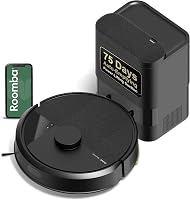
Choose the Roomba 105 Vac for room targeting or the Roborock Q7 M5+ for vacuuming and mopping. Both pair app controls with LiDAR navigation and self-emptying docks.
The Roomba maps your home with ClearView LiDAR and cleans in rows. Its app lets you target rooms, set keep-out zones, adjust suction and cleaning passes, check time estimates and track filter life.
It suits someone who wants dry floor cleaning with control over where the robot goes. Skip it if avoiding network setup is your main requirement, or if you specifically want a mop.
The Roborock combines PreciSense LiDAR mapping with app schedules, spot cleaning, no-go zones and progress checks. Its anti-tangle brush design makes it worth considering for a pet home where brush upkeep is a concern.
Its mop has 3 water-flow settings. Choose it if you want that extra hard-floor task; skip it if you won't use a mop or don't want to handle a damp pad.
Self-emptying reduces one chore, but it doesn't clean brushes or wash mop pads. Read what a self-empty station does if bin handling is a major reason you're considering either connected model.
Do I need Wi-Fi for a robot vacuum with an app?
Yes, the connected models here use 2.4 GHz Wi-Fi for their app connection. The Roomba specifies that band for setup and operation, and the Roborock app supports it only.
Before buying, confirm that your router provides the required band. A phone using 5 GHz doesn't mean your router lacks 2.4 GHz; many routers provide both.
For the Roomba, your phone can return to 5 GHz after setup while the robot stays on its supported band. Roborock's official Wi-Fi guidance explains its network-band requirements.
Wi-Fi and internet service are separate: Wi-Fi is the local wireless connection, while internet service connects your home to outside services. During an outage, check the model's manual rather than assuming its buttons, app and saved routines behave alike.
How should you set up your first cleaning run?
Start with a clear floor and a fixed dock position. Follow the model's instructions for charging, dock clearance and initial setup before sending it out.
- Pick up cables, socks, small toys and loose rug fringe.
- Move pet bowls if the robot could push them or spread spilled water.
- Leave doors open to rooms you want cleaned, and close doors to areas you want excluded.
- Watch the first run for low furniture, awkward thresholds and rugs that catch the robot.
- Adjust the room before relying on scheduled cleaning.
For a remote model, learn the start, stop and return controls before setting a routine. If it supports scheduling, check its clock and choose a time when the floor will be clear.
For an app model, pair it near the dock using the brand's instructions. After mapping, check room divisions and any virtual boundaries before relying on them.
Don't assume mapping means the robot can recognize every hazard. Check the floor for pet accidents before each unattended run.
Which buying and care mistakes should you avoid?
Avoid choosing by connectivity alone. Floor type, furniture clearance and the work you're willing to do matter just as much as phone controls.
A robot that reaches under the sofa may solve a daily problem better than one with extra app settings. Measure first, leaving some clearance rather than choosing a body that barely fits.
For carpet, compare pile height and brush design before focusing on suction numbers. Our robot vacuum guide for carpet explains the main trade-offs.
Don't confuse an anti-tangle design with freedom from maintenance. Check side brushes, wheels and intake openings for hair, and empty a manually emptied bin before debris restricts airflow.
Follow the manual before washing filters or other parts. Let washable parts dry fully before reinstalling them, and clean sensors and charging contacts as directed.
Use our guide to cleaning a robot vacuum for routine care. If you're planning for replacement parts and longer-term upkeep, read how long robot vacuums last.
Pet owners should weigh hair handling alongside control options. Our complete robot vacuum guide for pet hair helps narrow that choice.
How can you protect a connected vacuum account?
Use a unique password and install software updates when available. Review app permissions during setup and allow access based on the features you plan to use.
For broader router and device advice, see the US Cybersecurity and Infrastructure Security Agency's digital home security guidance.
If you don't want to manage an app account or connect another device to your network, buy an offline model from the start.
Do you need Wi-Fi for your robot vacuum? Make the choice
Choose offline control if everyone at home should be able to start cleaning with a remote. Pick the ILIFE V2 for hard-floor pet hair and preset routines, or the eufy 11S MAX when low furniture clearance and mixed floors drive the choice.
Choose the Roomba 105 Vac when selecting rooms is the main benefit you want from an app. Pick the Roborock Q7 M5+ when you'll also use its mop and accept the pad care that comes with it.
Before ordering, name the one task you want to make easier: starting a run, cleaning a particular room, handling hair or emptying the bin. That answer will tell you more than Wi-Fi alone.
If tangled hair is that task, compare brush choices in our guide to robot vacuums for long hair.
Frequently asked questions
Do I need Wi-Fi for a robot vacuum?
No, you don't need Wi-Fi for a robot vacuum designed for offline use; the ILIFE V2 and eufy 11S MAX work through physical remotes and onboard buttons. Connected models use Wi-Fi for app features, so choose based on whether you need room selection, maps or virtual boundaries.
Can I use a robot vacuum if my internet goes down?
Yes, if the vacuum is designed to operate without a network connection; the ILIFE V2 and eufy 11S MAX fit that need. For a connected model, check its manual for outage behavior, including which button controls and saved schedules remain available when internet service stops.
Can a robot vacuum work with 5 GHz Wi-Fi?
It depends on the model, but the connected robots here need 2.4 GHz; the Roomba 105 Vac specifies that band for setup and operation, and the Roborock Q7 M5+ app supports it only. Your router must provide the supported band, even if your phone normally uses 5 GHz.
Is a robot vacuum without an app easier to use?
A remote-controlled model is easier to set up if you want to avoid an account, app and network pairing; it can be less convenient if you need room-by-room control or virtual boundaries. Choose based on the steps you'll use each week, rather than setup alone.
Can I schedule a robot vacuum without Wi-Fi?
Yes, some offline models support preset schedules; the ILIFE V2 offers scheduled cleaning without requiring Wi-Fi for operation. Check the instructions for setting its clock and cleaning time, and review those settings after a reset; a remote control by itself does not establish that another model supports scheduling.