How to Choose a Robot Vacuum for Carpet
Choose a robot vacuum for carpet by matching carpet pile, brush design and rug clearance to your floors. Then choose suction controls, mop handling and bin emptying features that reduce the chores you do most often.
On this page (14 sections)
- What should you check in a robot vacuum for carpet?
- How does carpet pile affect a robot vacuum?
- Which brush design works best for carpet and pet hair?
- Does a robot vacuum need carpet boost?
- Should a robot vacuum for carpet have a mop?
- How important are mapping and no-go zones?
- Which of these four robot vacuums fits your home?
- Should you choose a self-emptying dock for carpet?
- How should you set up a robot vacuum on carpet?
- How often should a robot clean carpet?
- What maintenance does carpet add?
- Which buying and use mistakes should you avoid?
- How can you choose the right robot vacuum for carpet?
- Sources
Choose a robot vacuum for carpet by matching carpet pile, brush design and rug clearance before comparing suction or dock features. The right choice should move through your rooms, collect everyday debris and fit a care routine you can keep.
Low-pile carpet is usually an easier match than deep, plush carpet. Loose fringe, curled rug corners and long hair can create more trouble than the size of the room.
Start with your hardest room, then choose the features that solve its problems. For a broader explanation of carpet limits, read whether robot vacuums work on carpet.
What should you check in a robot vacuum for carpet?
Check floor compatibility first, cleaning tools second and convenience features third. A large dock or detailed app won't help if the robot repeatedly gets stuck at your main rug.
Walk through the rooms you want cleaned and make a short checklist:
- Carpet pile: short and firm, medium, or deep and soft.
- Rug edges: flat, raised, curled or fringed.
- Debris: loose crumbs, tracked-in grit, short pet hair or long strands.
- Access: low furniture, narrow gaps and door thresholds.
- Care: how often you can empty a bin and clear a brush.
Measure the space beneath furniture if under-sofa cleaning matters. Leave room above the robot rather than choosing a model that barely matches the gap, especially where carpet adds height beneath its wheels.
Also decide what you expect the robot to replace. It can take over frequent floor passes, but stairs, upholstery and carpet edges may still need another vacuum.
Robot vacuum for carpet feature examples
How does carpet pile affect a robot vacuum?
Short, firm pile gives a robot an easier surface to cross, while deep pile can slow wheels and interfere with brush movement. Rug edges also matter because the robot must climb onto the carpet before it can clean it.
Check the thickest rug in your home, including its backing and any pad beneath it. A rug's total edge height and softness can create a harder crossing than its pile alone suggests.
Loose rugs can bunch when a robot turns or climbs an edge. Secure curled corners with a method suited to your floor and rug, and keep fringe outside the cleaning path.
Looped, delicate or shag carpets deserve extra care. Follow both the carpet maker's brush guidance and the robot brand's floor restrictions, since a rotating brush may be unsuitable for some fibers.
For deep rugs, read what to know about robot vacuums for thick carpet. None of the four models here has a supplied maximum carpet-pile limit, so confirm compatibility if your main rooms have high pile.
Which brush design works best for carpet and pet hair?
Choose a brush that can work through your carpet and is easy to clear of hair. Brush contact helps loosen debris from fibers, while accessible rollers and end caps make routine care less of a chore.
Short pet hair can work down into carpet, while long strands tend to wind around moving parts. If your home has both, plan for regular cleaning passes and brush checks rather than relying on suction alone.
Self-cleaning and anti-tangle designs aim to reduce wrapped hair. They still need inspection, particularly around roller ends, side brushes and wheel axles.
Before choosing, read the brush-removal instructions and check how replacement parts are obtained. A brush you can remove easily is useful when carpet and shedding pets make cleaning a frequent task.
Our robot vacuum guide for pet hair covers the wider choice. For long strands, see how to stop hair tangling in a robot vacuum brush.
Does a robot vacuum need carpet boost?
Carpet boost is useful when the robot moves between rugs and hard floors, because it raises suction automatically on carpet. Manual suction control is also useful when you want more power in selected rooms.
Use extra suction where grit and hair collect, such as a carpeted hallway or a pet's favorite resting spot. A lightly used bedroom may not need the same setting as the entrance to your living room.
Higher settings generally use more battery and can increase noise. Plan demanding carpet runs when the sound won't interrupt work or sleep, and give the robot enough time to finish.
Compare suction figures only when their conditions are clear. A maximum available in one cleaning mode is different from the setting used across an entire room.
Read what Pa means for robot vacuum suction before choosing by a number. Brush action, airflow and movement across your carpet belong in the same decision.
Should a robot vacuum for carpet have a mop?
Choose a mop model if hard-floor cleaning is a regular part of the job. For a mostly carpeted home, a vacuum-only robot avoids mop-pad care and decisions about wet cleaning routes.
Mop lift is clearance between the damp pad and the floor, not a promise that every carpet stays untouched. Soft pile can rise into that space, and a thick rug edge can complicate the crossing.
For deep or delicate rugs, use the model's supported carpet-avoidance settings or remove the mop module when the instructions allow it. Watch the first mixed-floor run and check that carpet stays dry.
Mopping also adds pad washing and drying to your routine. Choose it because you need hard-floor care, rather than treating an extra function as an automatic benefit.
Our comparison of robot vacuum and mop versus vacuum-only models explains which setup fits each home.
How important are mapping and no-go zones?
Mapping helps the robot cover rooms in an organized way, while boundaries keep it away from known trouble spots. These controls are useful around fringe, pet bowls, cables and rugs the robot can't cross.
All four models here use LiDAR mapping and offer app boundaries or keep-out controls. Use those tools to define practical cleaning areas rather than expecting obstacle detection to solve every floor problem.
A room map also helps you clean where dirt builds up without sending the robot through the whole home. Keep doors in their usual positions during setup so the map reflects the rooms you want covered.
Obstacle avoidance still leaves preparation work for you. Pick up cords, socks and small toys, and check pet areas before any scheduled run.
For homes with pets that may have accidents, read what to know about robot vacuums and pet accidents. Do not assume an obstacle sensor can identify every mess.
Which of these four robot vacuums fits your home?
Choose by the chore you most want to reduce: repeated carpet passes, switching between floor types, handling a dustbin or directing room cleaning. These models offer different combinations of those tools.
| Product | Main reason to choose it | Main reason to skip it |
|---|---|---|
| Shark AV2501S | Bagless self-emptying and repeated grid coverage | You prefer disposing of debris in a closed bag |
| Roborock Q10 S5+ | Carpet-aware vacuuming plus hard-floor mopping | Your home is mostly carpet and you won't use the mop |
| ILIFE A30s | Vacuum-only cleaning with carpet boost and a remote | You want automatic bin emptying |
| Roomba 105 Vac | Bagged self-emptying and adjustable room cleaning | You want a mop in the same machine |
Shark AV2501S: for scheduled cleaning without dock bags
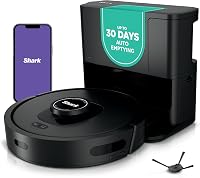
Choose Shark AV2501S if you want bagless debris collection and repeated grid passes. Its Matrix Clean system makes multiple passes across dirt, and the self-cleaning brushroll is designed to reduce hair wrap.
Shark says the base holds up to 30 days of debris and uses true HEPA filtration to capture 99.97% of dust and allergens down to 0.3 microns. The actual emptying interval will depend on how much debris your floors produce.
Its up-to-120-minute runtime includes Recharge and Resume, allowing it to recharge and continue a job. That suits someone who schedules cleaning while allowing a longer window for completion.
Skip it if your priority is throwing away a closed dust bag. A bagless dock still needs its collected contents tipped out, so choose the disposal method you're comfortable handling.
Roborock Q10 S5+: for carpet beside hard floors
Choose Roborock Q10 S5+ if you want one robot for vacuuming carpet and mopping hard floors. It combines ultrasonic carpet detection, automatic suction boost and a mop that lifts up to 8 mm.
The model has 10,000 Pa suction, dual anti-tangle brushes and structured-light obstacle avoidance. Its app lets you adjust suction, mopping levels, emptying modes and no-go zones.
Roborock says the station's 2.7 L dust bag can hold up to 70 days of debris. Plan bag checks around your household's hair and dirt load rather than using that interval as a fixed schedule.
Skip it if nearly all your floors are carpet or you don't want mop upkeep. Deep-pile rugs also need a separate clearance decision; automatic lift doesn't remove that step.
ILIFE A30s: for vacuum-only cleaning with a remote
Choose ILIFE A30s if you want carpet boost without a mop and don't mind emptying the robot yourself. It has dual anti-tangle brushes, room and area controls, and an included remote for basic operation.
Its suction reaches up to 10,000 Pa in Spot Mode. Treat that as a focused-cleaning setting rather than assuming the same maximum applies to every scheduled room run.
The 500 ml dustbin makes bin checks part of your routine, especially during shedding periods. ILIFE gives a battery life of up to 150 minutes, though demanding carpet settings can affect how much ground a charge covers.
Skip it if reducing dustbin handling is your main goal. Its included docking station charges the robot; it is not a self-emptying station.
Roomba 105 Vac: for targeted rooms and bagged disposal
Choose Roomba 105 Vac if you want bagged self-emptying with control over suction and cleaning passes. You can schedule rooms, set keep-out zones and direct spot cleaning to one area for up to 5 minutes.
Its multi-surface brush and edge-sweeping brush handle the dry-floor cleaning job. iRobot gives a battery life of up to 200 minutes and says the AutoEmpty dock holds up to 75 days of debris.
The bagged dock suits someone who prefers removing a used bag to tipping out loose dirt. Remember to keep replacement bags available so dock care doesn't interrupt the cleaning routine.
Skip it if you want hard-floor mopping in the same robot. Choose it for its room controls and disposal setup, rather than treating a long runtime as proof of better carpet pickup.
Should you choose a self-emptying dock for carpet?
Choose a self-emptying dock when frequent bin handling would stop you using the robot regularly. Carpet fibers and pet hair can take up bin space, making automatic emptying useful in busy homes.
Bagless docks avoid replacement dust bags but require you to pour out collected debris. Bagged docks add a supply to keep on hand and let you discard the bag with its contents inside.
Neither style clears hair from the brush or removes blockages from the robot. Check the bin and transfer path if debris remains after docking.
Leave accessible space around the dock for both the robot and your own maintenance. Our guide to choosing a self-emptying robot vacuum explains the practical differences.
How should you set up a robot vacuum on carpet?
Start with a prepared floor, a stable dock and a supervised first run. Use the early runs to identify difficult rug edges before setting a recurring schedule.
- Remove cords, small objects and loose fabric from the floor.
- Place the dock on a firm, level surface allowed by the manual, with the required clearance.
- Open the rooms you want mapped and complete the model's setup process.
- Watch the robot cross each rug and doorway.
- Add boundaries around repeated trouble spots.
- Set room schedules after the routes work reliably.
For app setup, Roborock Q10 S5+, ILIFE A30s and Roomba 105 Vac require a 2.4 GHz Wi-Fi network. Check your router settings beforehand if your phone normally connects to a 5 GHz network.
Start with a normal cleaning setting, then increase suction or passes only where needed. If a rug bunches or the robot stalls, address access or exclude the rug rather than repeatedly sending it into the same obstacle.
How often should a robot clean carpet?
Run it often enough to collect debris before it builds up, then adjust by room. A busy pet area may need daily attention, while a spare bedroom can follow a lighter schedule.
For heavily soiled carpet, remove the initial buildup with your main vacuum before relying on routine robot runs. This reduces the chance that the robot's bin fills early during its first jobs.
Watch the floor between runs instead of adding passes everywhere. Extra attention to a gritty entry route can be more useful than repeatedly cleaning an already tidy room.
Keep another vacuum for stairs, upholstery and deeper carpet care. Your robot's role is regular floor upkeep, with the schedule shaped around the rooms it can reach.
What maintenance does carpet add?
Carpet adds hair and loose fibers that need clearing from moving parts. A self-emptying dock reduces one chore, but brush, wheel and filter care still determine how reliably the robot runs.
After the first few runs, switch the robot off as instructed and inspect the roller, its ends, side brushes and wheels. Use what you find to set a care schedule.
Empty a manual bin before hair becomes packed inside it. If a self-emptying robot leaves debris behind, inspect for a blockage rather than assuming the dock bag or container is full.
Follow the model's filter instructions, including whether washing is allowed. Let any washable parts dry fully before refitting them, and replace worn brushes or filters as directed.
If hair drives most of the upkeep, compare robot vacuums for carpet and pet hair. Our robot vacuum cleaning guide covers the brush, bin and other parts.
Which buying and use mistakes should you avoid?
Avoid choosing by one headline feature and overlooking how the robot will move through your home. A suitable floor match and manageable care routine matter more than a feature you won't use.
- Choosing by maximum suction alone: compare the cleaning mode, brush and carpet fit together.
- Confusing mop lift with rug-climbing ability: they solve different problems.
- Scheduling before checking routes: watch rug crossings and add boundaries first.
- Expecting dock capacity to be a fixed interval: inspect it more often during heavy shedding.
- Ignoring brush wrap: clear hair before it restricts movement.
- Expecting mapping to replace tidying: cords and loose objects still need attention.
Also avoid buying a mop combo just to gain another function. If your hard floors are small or already easy to clean, vacuum-only operation may better match the job you need done.
How can you choose the right robot vacuum for carpet?
Choose your robot vacuum for carpet by matching the floor first and the daily chore second. Confirm the highest pile and hardest rug crossing before committing to a dock or mop system.
Pick Shark AV2501S for bagless emptying and repeated grid coverage. Choose Roborock Q10 S5+ when hard-floor mopping is a real need alongside carpet cleaning.
Choose ILIFE A30s if you prefer vacuum-only operation and accept manual bin emptying. Pick Roomba 105 Vac if bagged disposal and control over room cleaning passes fit your routine.
Before ordering, decide where the dock will sit and which rugs may need boundaries. For a broader pet-focused comparison, continue to the best robot vacuums for carpet and pet hair.
Sources
Use these brand resources to check model instructions and carpet restrictions before buying.
Frequently asked questions
What should I look for in a robot vacuum for carpet?
Start with carpet compatibility, brush design and clearance over rug edges. Then compare suction controls, room mapping and bin emptying options against your routine; homes with shedding pets need easy brush access, while mixed-floor homes also need a clear plan for keeping damp mop pads away from carpet.
Do robot vacuums work on thick carpet?
Some robot vacuums can handle some thick carpets, but deep pile can restrict movement and catch brushes. Check the brand’s guidance for your exact model and carpet before buying; a high suction figure does not establish that a robot can cross a thick rug or clean it reliably.
Is stronger suction always better for carpet?
Stronger suction can help with carpet debris, but brush contact and steady movement matter too. Compare adjustable suction, carpet boost and cleaning passes rather than ranking models by Pa alone; use a stronger setting where needed, then check that the robot still moves freely and completes the intended area.
Should I get a robot vacuum with a mop for carpet?
Choose a mop model when you also have hard floors you want it to clean. Roborock Q10 S5+ detects carpet and lifts its mop up to 8 mm, but that does not guarantee clearance over deep pile; for mostly carpeted homes, a vacuum-only model keeps the routine simpler.
How often should I clean a robot vacuum used on carpet?
Inspect the brush and wheels after the first few carpet runs, then set a routine based on how quickly hair and fibers collect. Empty the bin before it becomes packed and follow the model’s filter care instructions; a self-emptying dock reduces bin handling but does not replace brush cleaning.