Shark AI Ultra Robot Vacuum Review: Worth It? (October 2026)
The Shark AI Ultra robot vacuum (AV2501S) suits pet homes that want scheduled vacuuming and less daily bin emptying. Choose it for Matrix Clean coverage and a bagless self-empty base, provided it fits beneath your furniture and you can keep its cleaning routes clear.
On this page (13 sections)
- The Shark AI Ultra robot vacuum at a glance
- Who should buy the Shark AI Ultra?
- How Matrix Clean and LiDAR mapping help
- What the bagless self-empty base changes
- Is the AV2501S suitable for pet hair and carpet?
- Check furniture clearance, runtime and controls before buying
- Which nearby Shark model should you choose?
- Shark AV2511AE: for fewer base-emptying trips
- Shark AV2820S: for transitions and edge debris
- Shark AV2110S: for mapped routines with boundaries
- How to set up the Shark AI Ultra for reliable runs
- Care habits and mistakes to avoid
- Should you choose the Shark AI Ultra robot vacuum?
The Shark AI Ultra robot vacuum (AV2501S) is a good fit for routine pet-hair cleanup with less daily bin emptying. Choose it if you want mapped cleaning and a bagless dock, and can make room for both the robot and its base.
Its strongest appeal is a repeatable cleaning routine: scheduled runs collect loose debris before it spreads, while the base handles the transfer from the robot's bin. You still need to clear problem objects and care for the brushroll and filters.
The Shark AI Ultra robot vacuum at a glance
The AV2501S combines mapped routes, repeat-pass cleaning and automatic bin emptying. That makes it a practical choice for pet homes where frequent vacuuming matters more than adding a mop.
Shark AV2501S: Best for routine pet-hair cleanup
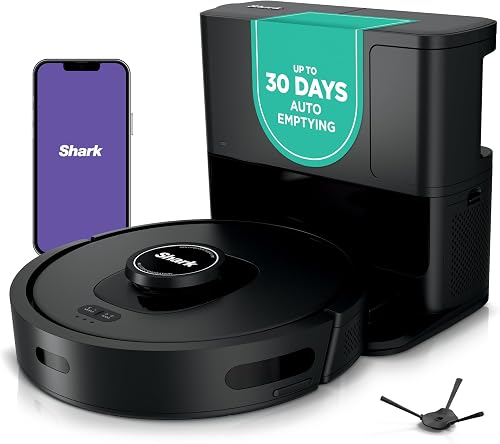
- 360° LiDAR home mapping
- Matrix Clean grid pattern
- Bagless base holds up to 30 days of debris
- Up to 120 minutes of runtime
Choose the AI Ultra for scheduled pet-hair pickup with mapped routes and repeat-pass cleaning. Its bagless base reduces daily bin chores, while the self-cleaning brushroll still needs regular checks.
Pros
- LiDAR home mapping
- Matrix Clean takes multiple passes over messes
- HEPA filtration in the bagless base
- Recharge and Resume
Cons
- Needs clearance beneath low furniture
- Base emptying depends on debris volume
- Brushroll and filters still need care
Its score reflects the fit between those features and routine pet-home cleaning. The main buying checks are furniture clearance, a suitable dock location and your willingness to handle regular upkeep.
If you're new to docks, read how a self-empty station works to understand which chores the base takes over.
Who should buy the Shark AI Ultra?
Buy the AV2501S if loose fur, crumbs and tracked-in dirt build up between regular cleaning sessions. It suits households that can schedule runs while keeping the floor reasonably clear.
A mostly open living area gives a robot more useful floor space to cover than a room packed with narrow furniture gaps. Think about the areas it can actually reach, rather than counting every room toward its value.
Pet owners should also consider when cleaning can happen safely. Run the robot after checking for accidents and spilled water, and choose a time when pets can settle away from its route.
Our self-emptying robot vacuum guide for pet hair covers more choices if shedding is your main buying concern.
When the Shark AI Ultra robot vacuum is the wrong fit
Skip this model if you need floor washing or expect to stop using a regular vacuum entirely. Stairs, upholstery and spaces beyond the robot's reach still need another cleaning tool.
It's also a poor match if you cannot make room for a permanent dock or keep access to it clear. A base behind a frequently closed door adds a daily chore that works against the reason to buy a robot.
How Matrix Clean and LiDAR mapping help
Matrix Clean provides grid-pattern coverage with multiple passes, while 360° LiDAR builds the home map used for organized routes. Shark says the mapping system detects objects and adapts to changes, including in low light.
These features address different needs: mapping helps the robot plan where to go, while repeat passes give it more chances to collect debris along its cleaning path. Allow enough time for the full job when setting a schedule.
Object detection is useful, but cords, shoelaces and small pet toys still belong off the floor. Don't use obstacle sensing as a reason to leave fragile items or pet accidents in its path.
Avoid judging cleaning ability by suction alone. The robot vacuum suction power guide explains how airflow, brush contact and floor conditions affect pickup.
What the bagless self-empty base changes
The base reduces routine onboard-bin emptying, but it creates a larger container that you must empty and maintain. Shark gives the AV2501S base up to 30 days of debris capacity, with no disposal bags required.
Treat that figure as a storage estimate rather than a calendar reminder. Check the level more often at first, especially during shedding season or after the robot begins collecting buildup from under furniture.
Shark says the base's true HEPA filtration captures and traps 99.97% of dust and allergens down to 0.3 microns. That describes particle capture inside the system and does not promise allergy relief.
Bagless storage suits buyers who want to avoid replacement disposal bags. When emptying it, keep the opening close to the trash container and avoid shaking debris out from a height.
Is the AV2501S suitable for pet hair and carpet?
The AV2501S is built for pet-hair collection on carpets and hard floors, with a self-cleaning brushroll to help manage hair wrap. It makes the most sense as a regular maintenance vacuum.
Daily or frequent runs can collect loose fur before foot traffic carries it into other rooms. Set the schedule around how quickly hair returns to your busiest areas, rather than running every room equally often.
Carpet fit depends on more than the presence of a pet-hair feature. Thick pile, loose rug edges and fringe can complicate movement, so watch how a robot handles each rug before leaving it to follow a schedule.
Read whether robot vacuums work on carpet if rugs cover much of your home. Keep a regular vacuum available for areas that need deeper attention or remain out of reach.
A self-cleaning brushroll still needs inspection around its ends, where hair can gather. Our guide to stopping hair tangles in a robot vacuum brush explains where to focus your checks.
Check furniture clearance, runtime and controls before buying
Measure the tightest route and the lowest furniture you want cleaned before choosing the AV2501S. Its body measures 13.7 in long, 13.7 in wide and 4.1 in high.
Allow clearance above the robot rather than relying on an exact-height gap. Also check chair legs and the route to the dock, since fitting under a sofa is only useful if the robot can reach it.
Runtime is up to 120 minutes, with Recharge and Resume for unfinished jobs. A run that includes recharging takes longer overall, so schedule larger areas with a generous time window.
App scheduling and voice control through Amazon Alexa or Google Assistant support regular routines. See whether a robot vacuum needs Wi-Fi if connectivity will affect where or how you use it.
Which nearby Shark model should you choose?
Choose the AV2501S for routine mapped pet-hair cleaning, the AV2511AE for more base storage, the AV2820S for floor and debris sensing, or the AV2110S for row-by-row cleaning with app boundaries. Match the extra features to a problem in your home.
| Model | Main reason to choose it | Base capacity | Runtime |
|---|---|---|---|
| Shark AV2501S | Matrix Clean repeat-pass coverage | Up to 30 days | Up to 120 minutes |
| Shark AV2511AE | More debris storage between emptying trips | Up to 60 days | Conflicting 90- and 120-minute figures |
| Shark AV2820S | Dirt, edge and floor sensing | Up to 30 days, HEPA base | 110 minutes |
| Shark AV2110S | SmartPath routes and app-set boundaries | Up to 30 days | 120 minutes |
Longer runtime matters most when charging breaks would interfere with your schedule. More base storage matters when the container fills quickly, but it won't reduce brushroll or wheel care.
For a wider brand comparison, read the Roomba and Shark robot vacuum differences.
Shark AV2511AE: for fewer base-emptying trips
Choose the AV2511AE if debris storage is your main reason to move beyond the AV2501S. It keeps Matrix Clean and LiDAR mapping while offering the larger base capacity shown above.
This model suits busy households that want more time between container-emptying trips. Its self-cleaning brushroll, app and voice controls, and Recharge and Resume support a scheduled routine.
Skip the upgrade if your main difficulty is hair around the wheels, inaccessible furniture gaps or cluttered floors. A larger container doesn't solve those problems.
Shark gives conflicting runtime figures for this model, so confirm battery life with Shark if uninterrupted coverage decides your choice. Choose it for vacuuming; don't select it on the assumption that it includes a mop.
Shark AV2820S: for transitions and edge debris
Choose the AV2820S if thresholds, changing floor types and debris along edges are your main concerns. Its PowerDetect features focus on adjusting cleaning to those conditions.
DirtDetect boosts suction when it senses debris, while FloorDetect adjusts brushroll engagement for different surfaces. EdgeDetect uses air to move debris from edges into the cleaning path.
Shark says NeverStuck technology lifts and lowers the robot to help cross obstacles and thresholds. Check its behavior at your own floor transitions before relying on scheduled runs through several rooms.
Skip this model if your home has open, level floors and your main goal is longer storage between emptying trips. The AV2511AE addresses that need more directly.
Shark AV2110S: for mapped routines with boundaries
Choose the AV2110S if row-by-row cleaning and app-set no-go zones match your routine. Its SmartPath system uses LiDAR to map rooms and plan coverage.
Targeted cleaning helps when one part of the home needs attention more often than the rest. No-go zones can keep the robot away from a recurring trouble spot, though you should still remove loose cords.
Skip it if you specifically want Matrix Clean's repeat-pass grid pattern or the AV2820S's floor and debris sensing features. Choose by the cleaning task rather than the model name.
For another route through competing brands, read Roomba vs Roborock for pet homes.
How to set up the Shark AI Ultra for reliable runs
Start with a permanent dock location and a clear mapping route. Follow Shark's setup instructions for dock spacing, charging and app connection before the first cleaning job.
Place the base where you can reach its debris container without moving furniture. Keep doors open to the rooms you want mapped, and put dining chairs and movable furniture in their usual positions.
Remove cords, socks, small toys and loose rug fringe before mapping. A map made with temporary boxes blocking doorways may not reflect the routes you want cleaned later.
Watch the first cleaning run through narrow gaps and over rug edges. Fix snag points before adding a schedule, then begin with a time when someone can check whether the robot returns to its dock.
Keep the base in the same place once the routine works. Moving it casually can complicate the robot's return route and create avoidable setup work.
Care habits and mistakes to avoid
Check the brushroll, wheels, sensors and debris path regularly, even when the base is not full. A self-emptying system reduces one chore, while hair and dust can still collect elsewhere.
Begin with frequent visual checks, then adjust the interval to your home's debris load. Follow Shark's instructions for cleaning filters, and reinstall washable parts only after they are fully dry.
A sudden change in pickup, movement or docking is a reason to inspect the robot before adding more cleaning runs. Look for wrapped hair, a blocked opening or an object caught near a wheel.
Avoid these common mistakes:
- Waiting for the advertised capacity interval before checking the base.
- Assuming a self-cleaning brushroll never needs attention.
- Scheduling a run without checking for pet accidents or wet spills.
- Leaving dock access blocked by shoes, bags or a closed door.
- Expecting the robot to clean stairs, upholstery or every furniture gap.
Use our robot vacuum cleaning guide to build a care routine that covers more than emptying the base.
Should you choose the Shark AI Ultra robot vacuum?
Choose the Shark AI Ultra robot vacuum AV2501S if routine pet-hair pickup is the job you want to automate, and its body fits the areas that matter. Make furniture clearance and dock placement your final checks before buying.
Choose the AV2511AE when fewer base-emptying trips matter most. Pick the AV2820S for transitions and sensing features, or the AV2110S when row-by-row routes and app boundaries suit your home.
If none fits your floor layout or shedding load, compare the best self-emptying robot vacuums for pet hair before deciding.
Frequently asked questions
Does the Shark AI Ultra AV2501S empty itself?
Yes, the AV2501S transfers debris from its onboard bin into a bagless self-empty base. Shark gives that base up to 30 days of capacity, but heavy shedding and tracked-in dirt can fill it sooner, so check the level regularly while you learn your home's emptying routine.
Can the Shark AI Ultra clean pet hair?
Yes, the AV2501S is designed to collect pet hair from carpets and hard floors using suction and a self-cleaning brushroll. Schedule regular runs to manage loose fur, then check the brush ends and wheels for wrapped hair; the self-cleaning design does not remove every upkeep task.
How long can the AV2501S run?
The AV2501S has up to 120 minutes of runtime and includes Recharge and Resume. It can return to its dock for power and continue an unfinished job, so allow extra time for charging when scheduling a larger area rather than treating the maximum runtime as a whole-home completion time.
Does the Shark AI Ultra need Wi-Fi?
Wi-Fi is needed for the AV2501S's connected app and voice features, including scheduling and commands through Amazon Alexa or Google Assistant. If you plan to use it without home Wi-Fi, confirm which offline controls Shark supports before buying rather than assuming every connected function remains available.