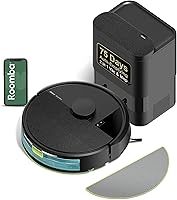
Roborock Q10 S5+ Robot Vacuum and Mop Review: Worth It? (October 2026)
The Roborock Q10 S5+ is a good fit for mixed-floor homes that want scheduled vacuuming, self-emptying and a lifting mop. Choose it if you'll handle mop care yourself; choose the Roomba Plus 405 if automatic pad washing and drying are priorities.
On this page (10 sections)
- The Roborock Q10 S5+ at a glance
- Who should buy the Q10 S5+, and who should skip it?
- What matters most in everyday cleaning?
- Roborock Q10 S5+ specifications that affect your choice
- How should you set up maps and obstacle avoidance?
- How do you set up Wi-Fi and a useful schedule?
- What care does the Q10 S5+ still need?
- Which alternative solves a different cleaning problem?
- Which buying mistakes should you avoid?
- Should you choose the Roborock Q10 S5+?
The Roborock Q10 S5+ is a good choice for mixed-floor homes that want regular vacuuming, light mopping and fewer trips to empty a robot's dust bin. Its strongest fit is a home with hard floors, low-pile rugs and an owner willing to clean the mop.
Choose around the work you want to reduce. This robot handles scheduled floor care and collected debris, while you'll still manage floor clutter, brush checks and wet-pad cleanup.
The Roborock Q10 S5+ at a glance
The Q10 S5+ suits routine cleaning across hard floors and carpet, with a lifting mop to help manage transitions. Its self-empty dock is useful for frequent runs, especially when hair and crumbs build up between deeper cleans.
Roborock Q10 S5+: Best for hard floors and low-pile rugs

- 10,000 Pa suction
- 2.7 L dust bag; Roborock estimates up to 70 days between changes
- VibraRise 2.0 mop lifts up to 8 mm on carpet
- LiDAR mapping and obstacle avoidance
Choose the Q10 S5+ for routine vacuuming and mopping across mixed floors. Its lifting mop helps with carpet transitions, while the self-empty dock reduces trips to the robot's dust bin.
Pros
- Self-emptying reduces routine bin emptying
- Mop lifts when carpet is detected
- Dual anti-tangle brush design for hair
- Multi-level maps and app no-go zones
Cons
- Requires 2.4 GHz Wi-Fi for app connection
- Limited mop clearance needs care around deep-pile rugs
- Plan to clean the mop yourself
The main reason to choose this model is its combination of carpet detection, active mopping and app controls. If your main goal is to stop washing mop pads yourself, the Roomba alternative below is the better fit.
Who should buy the Q10 S5+, and who should skip it?
Buy the Q10 S5+ if you'll use both vacuuming and mopping regularly. Skip it if most of your floor is thick carpet or you want a dock that washes and dries the mop.
A household with a hard-floor kitchen, carpeted rooms and shedding pets has a clear use for this mix of features. You can schedule upkeep where debris gathers and protect spaces that need a different cleaning approach.
The dual anti-tangle system also makes it relevant to homes with long hair. Roborock says the JawScrapers Comb main brush and anti-tangle side brush reduce wrapping, but brush ends still deserve regular inspection.
For help matching a robot to shedding and flooring, start with our robot vacuum guide for pet hair.
Is the Roborock Q10 S5+ right for your cleaning routine?
It's a good fit if you can prepare the floor and care for the mop in exchange for more regular cleaning. Someone who can run it several times a week will get more use from its scheduling than someone who leaves it parked until a major cleanup.
Skip the combo approach if you rarely wet-clean your floors or don't want another pad to wash. Our robot vacuum and mop versus vacuum-only guide explains when a simpler setup makes sense.
What matters most in everyday cleaning?
The most useful features are debris storage, carpet-aware mopping and control over cleaning routes. Each reduces a different task, so focus on your household's main source of cleanup work.
Self-emptying reduces bin trips
The dock collects debris in a 2.7 L dust bag, which Roborock estimates can last up to 70 days. Heavy shedding, frequent runs and an initial cleanup of dusty floors can fill it sooner.
Use the early weeks to learn your replacement interval. Keep a spare bag available so a full one doesn't interrupt the routine you've set up.
Self-emptying doesn't remove brush, filter or mop care. Our guide to what a self-empty station does explains which tasks the dock takes over.
Suction works alongside brush contact and cleaning frequency
The Q10 S5+ has 10,000 Pa suction and increases suction automatically on carpet. Frequent runs help keep loose hair and grit from building into a larger cleanup job.
For carpet, brush contact, pile depth and access under furniture also matter. Choose around those conditions rather than treating suction pressure as the only buying rule.
Our explanation of robot vacuum suction power in Pa helps put the number in context.
The lifting mop needs a sensible rug plan
The mop lifts up to 8 mm when carpet is detected. Low-pile rugs are the more practical match, while deep pile, loose edges and tassels need closer attention.
During an early wet-cleaning run, watch the transitions and check that the damp pad stays clear. Keep unsuitable rugs out of mopping routes instead of assuming carpet detection solves every rug problem.
VibraRise 2.0 uses dual-zone sonic vibration, with Roborock claiming up to 3,000 scrubbing movements per minute. Use it for routine floor film and light marks, and remove sticky spills or stubborn residue separately.
Roborock Q10 S5+ specifications that affect your choice
The key specifications concern floor transitions, network compatibility and debris storage. Use these details to confirm the robot fits your home before ordering.
| Spec | Roborock Q10 S5+ |
|---|---|
| Suction | 10,000 Pa |
| Dust bag capacity | 2.7 L |
| Estimated time between bag changes | Up to 70 days, according to Roborock |
| Mop system | VibraRise 2.0 |
| Mop lift | Up to 8 mm on carpet |
| Carpet detection | Ultrasonic |
| Navigation | PreciSense LiDAR |
| Obstacle avoidance | ReactiveTech structured light |
| Battery life | 150 minutes |
| Wi-Fi | 2.4 GHz only |
| App and voice control | Roborock app, Alexa and Google Home |
Battery life isn't a floor-area promise. Room layout, cleaning settings and extra passes affect how much work fits into a run.
How should you set up maps and obstacle avoidance?
Start with a clear floor and a stable dock position, then build the cleaning routine around the map. Moving the dock after setup adds an avoidable complication.
PreciSense LiDAR supports multi-level mapping, which helps organize cleaning across different floors. The robot still needs to be carried between levels, and stairs remain a separate cleaning job.
ReactiveTech uses structured light for obstacle avoidance. Pick up cords, socks, small toys and loose pet items before a run so the robot has fewer chances to snag something.
Don't rely on obstacle avoidance to manage pet accidents. Inspect pet areas first, and use no-go zones to keep the robot away from feeding stations or places that need supervision.
After mapping, check room boundaries and blocked areas in the app. Start with one manageable cleaning area so you can spot awkward furniture gaps or rug edges before scheduling the whole home.
How do you set up Wi-Fi and a useful schedule?
Connect through 2.4 GHz Wi-Fi, then schedule cleaning for times when floors are clear. Confirm that your router provides that band before starting app setup.
If your router combines both bands under one network name and pairing fails, follow its instructions for connecting devices that need a specific band. Keep the phone and robot near the router during setup.
Place the dock on a stable surface with an open approach, following the manual's clearance guidance. Leave enough access to remove the dust bag and reach the robot for maintenance.
For the first few runs, stay nearby to identify trouble spots. Once routes work well, schedule around your home's mess patterns, such as kitchen crumbs after meals or hair in the rooms pets use most.
Avoid starting with the strongest settings everywhere. Adjust suction and mopping levels by area, and add attention where debris remains instead of making every run more demanding.
What care does the Q10 S5+ still need?
Plan for mop cleaning after wet runs and regular checks of the dry-cleaning parts. A self-empty dock reduces one chore, but neglected brushes or a dirty pad can undermine the routine.
Remove and clean the mop after use, then let it dry before storage. Start the next wet run with a clean pad so yesterday's dirt doesn't get spread across another room.
Check the main brush, side brush and wheels for wrapped hair or thread. Anti-tangle designs reduce wrapping; they don't make these parts maintenance-free.
Keep sensors and charging contacts clean using the method in the manual. Inspect filters and air passages too, especially if debris remains in the robot after docking.
Use only cleaning liquids and care methods approved for the robot and your floor finish. Don't add household detergent by guesswork, and never reinstall washed parts while they're still damp.
Our guide to cleaning a robot vacuum gives you a maintenance routine to follow.
Which alternative solves a different cleaning problem?
Choose an alternative when its mop or dock setup better matches the chore you dislike most. These models offer different reasons to buy, even though all combine vacuuming and mopping.
Roborock Q7 M5+: for mostly hard-floor homes
Choose the Q7 M5+ if you want self-emptying and adjustable mopping for mostly hard floors. It shares the Q10's suction and bag capacity, so focus your comparison on floor handling rather than those headline numbers.
Its 3 water-flow settings let you adjust wet cleaning to the area. Follow your floor maker's guidance on moisture, especially around wood seams and finishes.
Skip it if your main reason for choosing the Q10 is its lifting, vibrating mop system. Our Q7 M5+ versus Q10 S5+ guide covers the closer comparison.
Roomba Plus 405: for frequent mopping with less pad handling
Choose the Roomba Plus 405 if automatic pad washing and drying will make you more likely to use the mop regularly. Its AutoWash dock also refreshes pads during cleaning.
The robot has spinning pads, SmartScrub and a vacuum-first-then-mop option. That last choice suits a routine where you want loose debris collected before wet cleaning begins.
Skip it if you mainly need dry pickup and only mop occasionally. The dock still needs care, so choose it because you'll use its wet-cleaning functions often.
Shark AV2610WA: for avoiding replacement dust bags
Choose the Shark AV2610WA if a reusable debris container suits you better than disposable bags. Its bagless base includes HEPA filtration, and Shark estimates storage for up to 60 days of debris.
Recharge and Resume lets the robot recharge and continue an unfinished job. Its sonic mop and Matrix cleaning pattern add options for hard-floor care and repeated passes.
Skip it if tipping loose debris into a trash can is the chore you're trying to avoid. Bagless storage removes replacement bags from the routine, but you still handle the collected dirt.
Which buying mistakes should you avoid?
Avoid choosing by one headline specification or expecting the dock to handle every maintenance task. The right match depends on floors, clutter and the chores you'll still do yourself.
- Ignoring floor-care rules: Confirm that your hard floors allow damp mopping before scheduling wet runs.
- Leaving problem rugs in the route: Loose fringe and thick pile need a plan before unattended cleaning.
- Waiting for a calendar reminder to check the bag: Inspect storage based on debris volume, especially during shedding season.
- Running over large messes: Pick up large debris, liquids and pet accidents before sending out the robot.
- Expecting complete coverage: Keep another cleaning tool for stairs, upholstery and areas the robot cannot reach.
If the dock is your main reason to buy, our self-emptying robot vacuum guide helps compare debris handling. For rug-heavy homes, read how to choose a robot vacuum for carpet before settling on a combo.
Should you choose the Roborock Q10 S5+?
Choose the Roborock Q10 S5+ for mixed floors when carpet-aware mopping matters and you're comfortable cleaning the pad yourself. Before ordering, confirm your network band, dock location and plan for thicker rugs.
Pick the Q7 M5+ for mostly hard-floor upkeep with adjustable water flow, the Roomba Plus 405 for automatic pad care, or the Shark AV2610WA for bagless debris storage.
If the Q7 remains your closest alternative, read our Q7 M5+ review and decide which mopping setup you'll use most often.
Frequently asked questions
Does the Roborock Q10 S5+ lift its mop on carpet?
Yes, the Q10 S5+ lifts its mopping module up to 8 mm when it detects carpet and increases suction automatically. Low-pile rugs are the more practical match for this feature, but check that the damp mop clears them during an early run and keep thicker rugs out of wet-cleaning routes.
How often does the Q10 S5+ need its dust bag changed?
Change the bag when it fills, rather than waiting for a fixed date. Roborock estimates up to 70 days from the 2.7 L bag, but frequent cleaning and heavy shedding can shorten that interval, so inspect it more often while you learn your home's routine.
Does the Roborock Q10 S5+ work with 5 GHz Wi-Fi?
No, the Q10 S5+ connects through 2.4 GHz Wi-Fi only. Check your router settings before setup, and select the 2.4 GHz network if the bands have separate names; if both share a name and pairing fails, follow your router's instructions for connecting devices that require that band.
Can the Q10 S5+ replace a regular mop?
Keep a regular mop for sticky spills, stubborn marks and areas the robot cannot reach. The Q10 S5+ is better suited to scheduled upkeep between deeper cleans, and a clean mop pad matters: remove and clean it after wet runs rather than leaving it dirty for the next session.