Roborock Q7 M5+ Robot Vacuum and Mop Review: Worth It? (October 2026)
The Roborock Q7 M5+ suits pet homes that want automatic bin emptying and routine vacuuming with light mopping. Choose the Q10 S5+ instead if sonic scrubbing and automatic carpet mop lift are priorities.
On this page (12 sections)
- The Roborock Q7 M5+ at a glance
- Who should consider the Roborock Q7 M5+?
- What does the self-empty dock change?
- How should you judge carpet cleaning and suction?
- What can the Q7 M5+ mop handle?
- How should you set up mapping and scheduled cleaning?
- Roborock Q7 M5+ specs that matter before buying
- Roborock Q7 M5+ vs Q7 L5
- Roborock Q7 M5+ vs Q10 S5+
- How does the Roomba 104 2-in-1 compare?
- What upkeep and common mistakes should you plan for?
- Should you buy the Roborock Q7 M5+?
The Roborock Q7 M5+ is a good fit for pet homes that want automatic bin emptying and regular floor upkeep, with occasional mopping alongside vacuuming. Choose it when collecting loose hair and dust matters more than getting a more advanced mop system.
Its appeal is a practical daily routine: schedule a clean, keep sensitive areas off limits and empty the dock bag when needed. You'll still handle floor preparation, brush checks and mop care.
The Roborock Q7 M5+ at a glance
The Q7 M5+ puts vacuuming convenience first, with a self-empty dock and brushes designed to resist hair wrap. Its mop adds hard-floor wiping without making this a replacement for every manual cleaning job.
Roborock Q7 M5+: Best for busy pet homes
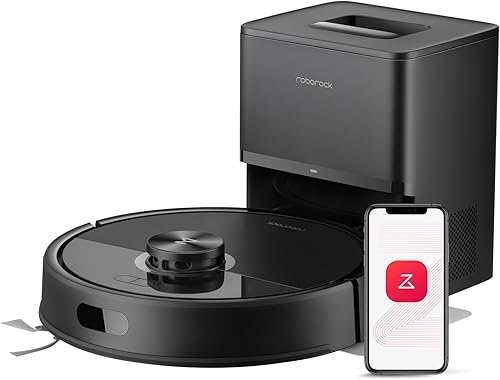
- 10,000 Pa suction
- 2.7 L sealed dust bag
- Dual anti-tangle brush design
- Vacuuming and mopping with 3 water flow settings
- PreciSense LiDAR mapping
Choose the Q7 M5+ for scheduled vacuuming, automatic bin emptying and light mopping between deeper floor cleans. Its brushes target hair wrap, but the mop and moving parts still need regular care.
Pros
- Automatic debris collection in a sealed bag
- Main and side brushes designed to resist hair wrap
- Adjustable mop water flow
- LiDAR mapping and app no-go zones
Cons
- Replacement dock bags needed
- 2.4 GHz Wi-Fi only
- Brush and mop care remain manual
The strongest reason to choose this model is a busy household where loose debris returns between full cleans. Regular runs can collect that debris before it gets carried into other rooms or worked into rugs.
Skip it if your main goal is scrubbing sticky kitchen marks or moving between wet mopping and carpet with minimal planning. The Q10 S5+ addresses those needs more directly.
PeachyCart's recommendation favors the Q7 M5+ for its fit with routine pet-home cleaning. The alternatives below suit buyers whose priorities differ.
Who should consider the Roborock Q7 M5+?
Buy the Q7 M5+ if frequent vacuuming and fewer bin-emptying stops would make your routine easier. It's especially relevant when you can keep a clear route through several rooms and give the dock a permanent home.
A robot is easier to use when chairs, pet beds and charging cables have predictable places. If your floor is usually covered with small objects, plan a quick pickup before each run.
Is the Roborock Q7 M5+ good for pet hair?
The Q7 M5+ suits routine shedding cleanup because Roborock's JawScrapers main brush and anti-tangle side brush target hair wrap. Long strands can still collect around brush ends, axles and wheels, so inspect those areas regularly.
For a broader starting point, our robot vacuum buying guide for pet hair explains how to match a robot to your pets and floors. Our guide to stopping pet hair from tangling in a robot vacuum covers brush care.
Who should skip this model?
Skip the Q7 M5+ if you want a robot to handle stairs, upholstery or every heavy carpet clean. Those jobs still call for another vacuum or manual cleaning.
It's also a poor fit if you expect automatic emptying to remove all upkeep. You'll need to manage replacement bags, clean moving parts and wash the mop.
What does the self-empty dock change?
The RockDock Plus reduces manual dustbin emptying by moving collected debris into a sealed bag. Roborock claims up to 7 to 9 weeks between bag changes, but heavy shedding and frequent runs can shorten that interval.
The useful benefit is fewer interruptions, especially if a small onboard bin would otherwise need attention after each clean. Treat the advertised interval as a planning estimate rather than a date to ignore the bag until.
Place the dock somewhere you can reach its bag compartment without moving furniture. Follow the manual's clearance instructions and keep the approach free of shoes, loose mats and pet bowls.
Automatic emptying handles dry debris; it doesn't wash the mop or clear wrapped hair from wheels. Our guide to self-empty stations on robot vacuums explains those separate jobs.
How should you judge carpet cleaning and suction?
Judge the Q7 M5+ by your carpet type and cleaning routine, alongside its suction specification. Low-pile areas with loose daily debris present a different job from dense rugs holding embedded hair.
Check rug edges, tassels and transitions during an initial supervised run. If the robot catches an edge or struggles to cross a threshold, adjust the route rather than letting the same problem repeat on a schedule.
For shedding on rugs, our robot vacuum guide for pet hair and carpet covers the main buying factors. Our guide to robot vacuums on carpet explains where thicker piles need extra attention.
Keep another vacuum available for stairs, corners the robot can't reach and deeper carpet care. Our explanation of what robot vacuum suction figures mean helps put Pa numbers in context.
What can the Q7 M5+ mop handle?
Use the Q7 M5+ mop for routine hard-floor wiping, especially fine dust left after loose debris is collected. Deal with spills, pet accidents and thick or sticky messes manually before sending a robot through the area.
Start with the lowest suitable water setting and follow your flooring maker's care instructions. More water isn't a shortcut to better cleaning, particularly on floors that limit damp mopping.
Plan a hard-floor route that excludes rugs when the mop is attached. A no-go zone blocks the robot from that area, so a protected rug also won't get vacuumed during that run.
Wash the pad after use and let it dry fully before storage. A dirty pad can spread residue into the next room, even when the robot follows the correct route.
For sonic scrubbing and automatic carpet mop lift, read our Q10 S5+ review.
How should you set up mapping and scheduled cleaning?
Set up the Q7 M5+ by clearing the floor and checking the first route before relying on a schedule. PreciSense LiDAR maps the home, while the app provides scheduling, spot cleaning, no-go zones and progress monitoring.
- Put the dock in its intended permanent spot and follow the supplied charging instructions.
- Pick up cables, socks, small toys and loose rug tassels.
- Open doors to rooms you want included in the map.
- Check the completed map and add no-go zones around sensitive areas.
- Watch an early cleaning run, then schedule cleaning for a time you can keep the floor clear.
Use boundaries around pet feeding stations rather than placing them so tightly that the robot must squeeze between bowls and furniture. Leave a workable route through doorways.
Mapping helps the robot plan paths, but it shouldn't be treated as a promise to avoid every small object. Inspect for pet accidents before each run, including scheduled ones.
If connection requirements affect your plans, see whether a robot vacuum needs Wi-Fi.
Roborock Q7 M5+ specs that matter before buying
The most useful specifications are dock capacity, cleaning controls and connection requirements. Check those against your routine before comparing minor differences that won't change how you use the robot.
| Spec | Roborock Q7 M5+ |
|---|---|
| Suction | 10,000 Pa |
| Dock dust bag | 2.7 L, sealed |
| Stated battery life | 150 minutes |
| Brush system | JawScrapers main brush and anti-tangle side brush |
| Navigation | PreciSense LiDAR |
| Mopping | Vacuum-and-mop cleaning with 3 water flow settings |
| App controls | Scheduling, spot cleaning, no-go zones and progress monitoring |
| Wi-Fi | 2.4 GHz |
| Weight | 10.6 lb |
Runtime is useful for planning, but don't assume the stated duration equals a fixed amount of floor coverage. Room layout, cleaning settings and repeated passes all affect how long a job takes.
Roborock Q7 M5+ vs Q7 L5
Choose the Q7 L5 if manual bin emptying is acceptable and you still want mapped vacuuming and mopping. Choose the Q7 M5+ when automatic debris collection is the feature that makes regular cleaning practical.
The L5 has 8,000 Pa suction, multi-level mapping and app or voice controls. Its 270 ml water tank and dustbin form one integrated part, so pay attention to both compartments during upkeep.
The L5 makes sense if you're comfortable checking the bin after each run. That can fit a smaller cleaning area or a household where someone already handles daily floor care.
Skip it if bending down to empty the robot is the chore you're trying to remove. Its included charging dock doesn't provide the Q7 M5+'s automatic emptying.
Roborock Q7 M5+ vs Q10 S5+
Choose the Q10 S5+ when mopping and carpet transitions drive your decision. Its extra features address those jobs rather than giving you a higher suction figure than the Q7 M5+.
The Q10 S5+ adds VibraRise 2.0 sonic mopping, ultrasonic carpet detection and up to 8 mm of mop lift. It also includes ReactiveTech structured-light obstacle avoidance.
That combination suits a hard-floor home with rugs along regular cleaning routes. Check thick rugs carefully, since limited mop clearance doesn't ensure a damp pad will clear every pile.
Skip the Q10 S5+ if you mainly want dry debris collected and only plan occasional hard-floor wiping. The Q7 M5+ already covers that routine without making advanced mopping the reason to choose it.
For the full comparison, see Roborock Q7 M5+ vs Q10 S5+.
How does the Roomba 104 2-in-1 compare?
Choose the Roomba 104 2-in-1 if keeping rugs out of mopping runs matches your preferred routine. It automatically avoids carpets while mopping and offers separate vacuum-only, mop-only and combined modes.
Its ClearView LiDAR mapping and app keep-out zones support room planning. iRobot says the AutoEmpty dock holds up to 75 days of debris, with the actual interval depending on what the robot collects.
This approach suits buyers happy to handle rugs in a separate vacuuming run. Skip it if you want a mopping run to continue vacuuming across those rugs, since avoiding them leaves them outside that clean.
Don't compare iRobot's relative suction claim directly with Roborock's Pa figures. They use different measures, so cleaning modes and floor handling offer a clearer basis for this choice.
What upkeep and common mistakes should you plan for?
Plan for brief, regular maintenance even with a self-empty dock. Catching a wrapped strand or dirty pad early is easier than dealing with a blocked route or repeated poor pickup.
After early runs, inspect the brush ends, wheels and debris path to learn where your home's hair collects. Check the dock bag more often during heavy shedding, then adjust your routine to match.
Follow the manual for filter care, and don't rinse a part unless its instructions permit it. Let any washable parts dry fully before reinstalling them.
Avoid these common mistakes:
- Leaving cords on the floor: lift charging leads and secure loose loops before a scheduled run.
- Using too much water: match the setting to the floor finish and the care instructions.
- Leaving a used mop attached: wash and dry the pad after mopping.
- Ignoring a full dock bag: replace it when needed rather than waiting for the advertised interval.
- Expecting maps to handle every hazard: clear small objects and check for pet accidents yourself.
- Adding ordinary floor cleaner: use only liquids permitted by the robot's instructions.
Our robot vacuum cleaning guide provides a fuller maintenance checklist.
Should you buy the Roborock Q7 M5+?
Buy the Roborock Q7 M5+ if frequent vacuuming with fewer emptying chores is your main goal. Make room for the dock and decide how you'll keep rugs outside damp-mopping routes before ordering.
Choose the Q7 L5 if you can handle manual bin emptying. Move to the Q10 S5+ for sonic scrubbing and automatic mop lift, or choose the Roomba 104 if you prefer rugs to be avoided during mopping.
If none matches your floor plan, compare our robot vacuum and mop picks for pet hair. Start with the job you need automated, then choose the robot whose remaining chores you're willing to do.
Frequently asked questions
Does the Roborock Q7 M5+ self-empty?
Yes, the Roborock Q7 M5+ includes a RockDock Plus auto-empty dock with a 2.7 L sealed dust bag; Roborock claims up to 7 to 9 weeks between bag changes. Heavy shedding can shorten that interval, and automatic emptying doesn't replace brush cleaning, filter care or mop washing.
Can the Roborock Q7 M5+ mop and vacuum at the same time?
Yes, the Q7 M5+ can vacuum and mop in one run, with 3 water flow settings for its mop module. Use a water level suitable for your floor finish and plan around rugs; choose the Q10 S5+ if you want sonic scrubbing and automatic carpet mop lift.
Is the Roborock Q7 M5+ suitable for pet hair?
Yes, the Q7 M5+ is a sensible choice for routine pet-hair pickup because it combines automatic bin emptying with brushes designed to resist hair wrap. Check brush ends and wheels during shedding season; clear pet toys and inspect floors for accidents before any scheduled run.
What Wi-Fi does the Roborock Q7 M5+ need?
The Q7 M5+ needs a 2.4 GHz Wi-Fi network for its app connection; check that your router offers that band before pairing, and follow the setup prompts near the dock. Our guide to whether a robot vacuum needs Wi-Fi explains how connectivity relates to cleaning controls.