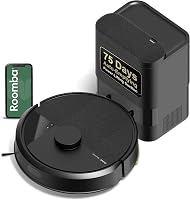
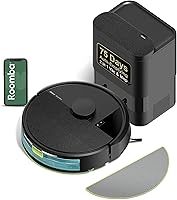
Roborock Q7 M5+ vs Q10 S5+: Which Should You Buy? (October 2026)
In the Roborock Q7 M5+ vs Q10 S5+ comparison, choose the Q7 M5+ for vacuum-first homes or the Q10 S5+ for frequent mopping and mixed floors. The Q10 adds sonic scrubbing, automatic carpet mop lift and obstacle avoidance.
On this page (11 sections)
- Roborock Q7 M5+ vs Q10 S5+: Which should you buy?
- How do their suction and pet-hair features compare?
- What changes when you mop with each robot?
- Which one is better around clutter?
- How do their self-empty docks compare?
- What app and mapping features do you get?
- How should you set up the first cleaning runs?
- What care will either robot still need?
- Which buying and use mistakes should you avoid?
- Side-by-side specs for the Q7 M5+ and Q10 S5+
- Which Roborock should you choose?
Choose the Q7 M5+ for vacuum-first cleaning or the Q10 S5+ for frequent mopping and mixed floors in this Roborock Q7 M5+ vs Q10 S5+ comparison. The deciding features are sonic scrubbing, automatic carpet mop lift and obstacle avoidance, all offered by the Q10.
Start with the job you want to hand over. Daily fur and crumb pickup points toward the Q7, while regular damp cleaning across hard floors and rugs gives the Q10's extra features a clear purpose.
The Q7 M5+ review and Q10 S5+ review cover each model separately. Here, the focus is choosing between them and building a routine you'll actually use.
Roborock Q7 M5+ vs Q10 S5+: Which should you buy?
The Q7 M5+ suits clear floors and occasional mopping; the Q10 S5+ suits frequent mop runs and mixed surfaces. Choose based on your weekly cleaning work rather than the higher model number.
Both have 10,000 Pa suction, dual anti-tangle brush designs and PreciSense LiDAR mapping. Each includes an auto-empty dock with a 2.7 L dust bag, so either can reduce how often you handle collected debris.
Buy the Q7 if fur, dust and dry crumbs make up most of the mess. Its simpler mop setup makes sense when you can keep damp cleaning on hard floors and handle sticky spots separately.
Buy the Q10 if the robot will mop several rooms regularly, cross rugs or work around objects left on the floor. Those are specific reasons to choose its added features.
Skip either if you expect complete floor care without preparation or upkeep. You'll still need to clear hazards, care for the mop and clean areas the robot can't reach.
For help deciding whether you need mopping at all, read our guide to robot vacuum and mop versus vacuum only.
How do their suction and pet-hair features compare?
Pet hair alone isn't a strong reason to choose the Q10. Both models combine the same headline suction figure with brushes designed to limit hair wrap.
The Q7 uses a JawScrapers main brush and an anti-tangle side brush. The Q10 uses a JawScrapers Comb main brush and a specialized anti-tangle side brush; Roborock says these designs reduce tangling.
Long strands can still gather around brush ends, axles and wheels. Check those areas when pickup drops or the robot starts leaving clumps, rather than waiting for a large knot.
Your schedule matters too. Frequent runs give the robot smaller amounts of loose fur to collect, while a long gap lets hair build up along walls and under furniture.
For a home with several shedding pets, begin with shorter gaps between runs and inspect the debris path often. Adjust the routine around actual buildup instead of assuming the dock removes every maintenance task.
Our guide to stopping pet hair from tangling in a robot vacuum brush explains where hair collects and how to remove it.
Which Roborock Q7 M5+ vs Q10 S5+ features matter for rugs?
The Q10's carpet detection and automatic suction increase make it the more convenient choice for routes that cross rugs. Its mop lift also helps when a damp-cleaning route moves between surfaces.
Rug height still matters. A lifting mop needs enough clearance above the pile, and soft or uneven rugs can create contact that you didn't expect.
Watch the first mixed-floor run and check rug edges for dampness afterward. Keep delicate or deep-pile rugs outside a damp-cleaning route if you can't maintain safe clearance.
If carpet covers most of your home, put carpet needs ahead of mop features. Our guide to choosing a robot vacuum for carpet covers pile, rug edges and other practical limits.
What changes when you mop with each robot?
The Q10 is the better fit for regular mopping, while the Q7 suits a light maintenance pass. The difference is scrubbing action and carpet handling, rather than simply adding water to a cleaning run.
The Q7 has 3 adjustable water flow settings. Start with the lowest suitable setting allowed by your floor maker, then judge the result by moisture left behind and how evenly the pad wipes.
Roborock says the Q10's VibraRise 2.0 system uses dual-zone sonic vibration at up to 3,000 scrubs per minute. That gives buyers who want active scrubbing a concrete reason to choose it.
Neither approach replaces prompt spill cleanup. Remove large spills, sticky food and anything that could spread across the room before sending a robot through.
Vacuum up loose grit before damp cleaning, and begin with a clean pad. A dirty pad can carry residue from the kitchen into the hallway even when the robot follows its route correctly.
Does the Q10 S5+ mop lift on carpet?
Yes, the Q10 lifts its mop up to 8 mm when its ultrasonic detection identifies carpet. That is useful for mixed floors, but it doesn't establish safe clearance over every rug.
Use a separate hard-floor route when rug pile or a delicate surface makes contact a concern. Automatic transitions are helpful only when they suit the floors along that route.
If you'd rarely attach a mop, our guide to vacuum and mop versus vacuum-only robots can help you decide how much weight to give this feature.
Which one is better around clutter?
The Q10 is the stronger choice for obstacle detection because it includes ReactiveTech structured-light obstacle avoidance. That feature addresses objects in the cleaning path, while room mapping handles the broader route.
LiDAR mapping and obstacle avoidance do different jobs. A useful room map doesn't remove a charging cable that has fallen beside the sofa since the last run.
Both models offer app-based no-go zones for places you want to exclude. Use them around a pet feeding area, a cable cluster or a fragile floor display that stays in one location.
Keep those boundaries current when furniture or pet supplies move. A zone that matched yesterday's room layout may leave today's problem spot exposed.
The Q7 suits households willing to do a quick pickup before scheduled cleaning. Choose the Q10 if added obstacle detection would help with a room that gets cluttered between runs, while still removing cords and small objects.
Check for pet accidents before either robot starts. Our guide to robot vacuums and pet accidents explains why obstacle detection shouldn't replace that check.
How do their self-empty docks compare?
Both docks reduce manual bin emptying, and neither should be chosen mainly for its advertised bag-change interval. How quickly a bag fills depends on the debris collected in your home.
Roborock advertises up to 7 to 9 weeks between bag changes for the Q7 and up to 70 days for the Q10. Heavy shedding, frequent cleaning and the first runs under dusty furniture can shorten those intervals.
Inspect the bag early in your routine to learn how fast it fills. If debris remains in the robot after emptying, check the bag fit and accessible debris path according to the manual.
Allow room to reach the dock and remove the bag. A location that hides it neatly but makes upkeep awkward can turn a simple job into one you'll put off.
If you're new to auto-emptying, read what a self-empty station does. Our guide to choosing a self-emptying robot vacuum covers the wider buying decision.
What app and mapping features do you get?
Both models support app scheduling and mapped cleaning, while the Q10 adds multi-level mapping and Alexa or Google Home voice control. Both require 2.4 GHz Wi-Fi for their connected features.
The Q7 app includes spot cleaning, no-go zones, progress tracking and battery monitoring. The Q10 app offers suction adjustment, emptying modes, carpet boost and mopping levels.
Choose the controls you'll use each week. Scheduling matters if you want cleaning during a regular window, while room boundaries matter if pet areas or rugs need to stay outside a route.
Voice control is useful for starting, pausing or sending the Q10 back to its dock. It doesn't replace the initial work of reviewing maps and choosing settings.
Multi-level mapping helps organize a home with more than one floor. Plan where the robot will be carried and stored, since mapped floors don't solve the physical task of moving it between levels.
For network questions, see whether a robot vacuum needs Wi-Fi.
How should you set up the first cleaning runs?
Start with a clear floor, a stable dock location and a supervised first route. These steps reveal access problems before you rely on a schedule.
Choose a dock position with the approach space required in the manual. Keep its cable secured and make sure you can reach the bag and robot without shifting furniture.
Open doors to rooms you want mapped, and remove loose cords, socks and pet toys. Tie up dangling fabric that could reach the brushes.
After mapping, review the room layout and add boundaries around trouble spots. Check narrow chair gaps, rug corners and furniture bases where the robot may need a different route.
Begin with a dry cleaning run before adding mopping. Separating these steps makes it easier to spot a route problem without also managing a wet pad.
For mopping, confirm that the floor allows damp cleaning and use only cleaning liquids approved in the robot's instructions. More water or stronger detergent isn't a shortcut to a cleaner floor.
Schedule the first few runs while you're available to intervene. Once the route works, move it to a time that suits the household and allows a pet-mess check beforehand.
What care will either robot still need?
Both robots need brush, filter, sensor and mop care, even with automatic emptying. Build those jobs into a short routine so they don't pile up.
After a mop run, remove and clean the pad as directed, then let it dry. Leaving a damp, dirty pad attached makes the next run start with yesterday's residue.
Inspect brush ends and wheels for wrapped hair. Use the removal method in the manual and avoid pulling hard on strands caught near small parts.
Follow each model's filter instructions rather than assuming every part can be rinsed. Any part approved for washing needs to dry fully before it goes back into the robot.
Keep sensors and charging contacts clean using the recommended method. If docking or route behavior changes, inspect for dirt and obstructions before changing several app settings at once.
Replace bags and worn parts according to their condition and the manual. Our guide to how to clean a robot vacuum provides a useful maintenance checklist.
Which buying and use mistakes should you avoid?
Avoid choosing by suction alone or treating self-emptying as complete upkeep. The useful differences here concern mopping, transitions and obstacles, so match those features to your rooms.
Don't choose the Q10 solely because it has more features. A mostly carpeted home with little need for damp cleaning may get limited use from its sonic mop.
Don't choose the Q7 for a hands-off mixed-floor mopping routine. It fits better when you can plan hard-floor cleaning separately and manage where its mop goes.
Avoid leaving every room open from the first day. Expand the route after you understand trouble spots, especially around rugs, pet areas and low furniture.
Don't run a damp pad over flooring whose care rules you're unsure about. Confirm the floor's requirements first, including any limits on water and cleaning solutions.
Finally, keep another cleaning tool for stairs, upholstery and tight corners. Either robot can take over routine floor passes without covering every cleaning job.
Side-by-side specs for the Q7 M5+ and Q10 S5+
Use the comparison to check your priorities, especially mopping and carpet transitions. Shared vacuuming features make the extra floor-care tools the clearest dividing line.
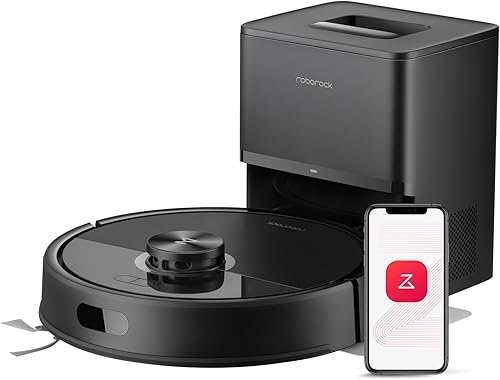

The Q7's higher score doesn't make it the right choice for every room. For a buyer who needs frequent scrubbing and automatic mop transitions, the Q10's feature set is the closer match.
Which Roborock should you choose?
For Roborock Q7 M5+ vs Q10 S5+, choose the Q7 if your plan is frequent dry cleaning, occasional hard-floor wiping and a quick pickup before each run. Skip it if automatic transitions during mopping are central to your routine.
Choose the Q10 if regular mopping, rugs along the route and obstacle detection solve daily problems in your home. Skip it if you'll rarely use those additions or expect its sensors to remove the need for floor checks.
Before ordering, trace one likely route through your rooms and note every rug, cord area and surface that shouldn't get damp. That turns a feature comparison into a practical choice.
For other options that combine fur pickup with damp cleaning, see our robot vacuum and mop combos for pet hair. The Q7 M5+ review and Q10 S5+ review provide a closer look at each finalist.
Frequently asked questions
What is the main difference between the Roborock Q7 M5+ and Q10 S5+?
The Q10 S5+ adds sonic scrubbing, automatic carpet mop lift and structured-light obstacle avoidance; the Q7 M5+ suits vacuum-first routines with occasional light mopping. Choose around those differences rather than suction alone, since both have the same headline suction figure and both include self-empty docks.
Do both Roborock models empty themselves?
Yes, both include an auto-empty dock that transfers collected debris into a dust bag. You still need to replace that bag, inspect the debris path and clean the robot's brushes and sensors; self-emptying reduces bin handling, but it doesn't wash the mop or remove wrapped hair.
Which Roborock is better for mopping?
The Q10 S5+ is the better choice for frequent mopping because its VibraRise 2.0 system adds sonic scrubbing and automatic carpet mop lift; the Q7 M5+ suits lighter upkeep with adjustable water flow. With either model, follow your floor maker's care instructions and clean the pad after use.
Can the Q10 S5+ avoid obstacles?
The Q10 S5+ uses ReactiveTech structured-light obstacle avoidance to help detect objects in its path. It suits homes where furniture and everyday clutter complicate cleaning routes, but you should still remove cords, small toys and pet mess before starting; obstacle avoidance doesn't make an unchecked floor safe.
Do either of these work without Wi-Fi?
Both models have button controls, while their connected app features require 2.4 GHz Wi-Fi. Plan on a compatible network if scheduling, maps and no-go zones are central to your routine; button controls provide another way to operate the robot, but they don't replace the app's map and settings controls.